ČOI and SOI lists
It compares the domain you visit against public lists from the Czech and Slovak Trade Inspection authorities, which it regularly updates.
BOIT Rizikové e-shopy is a free extension that displays a clear warning when you visit a known risky shop and flags other suspicious signs too.
Works in Chrome, Edge, Brave, Vivaldi, Opera, Arc and Firefox. Free to install and use.
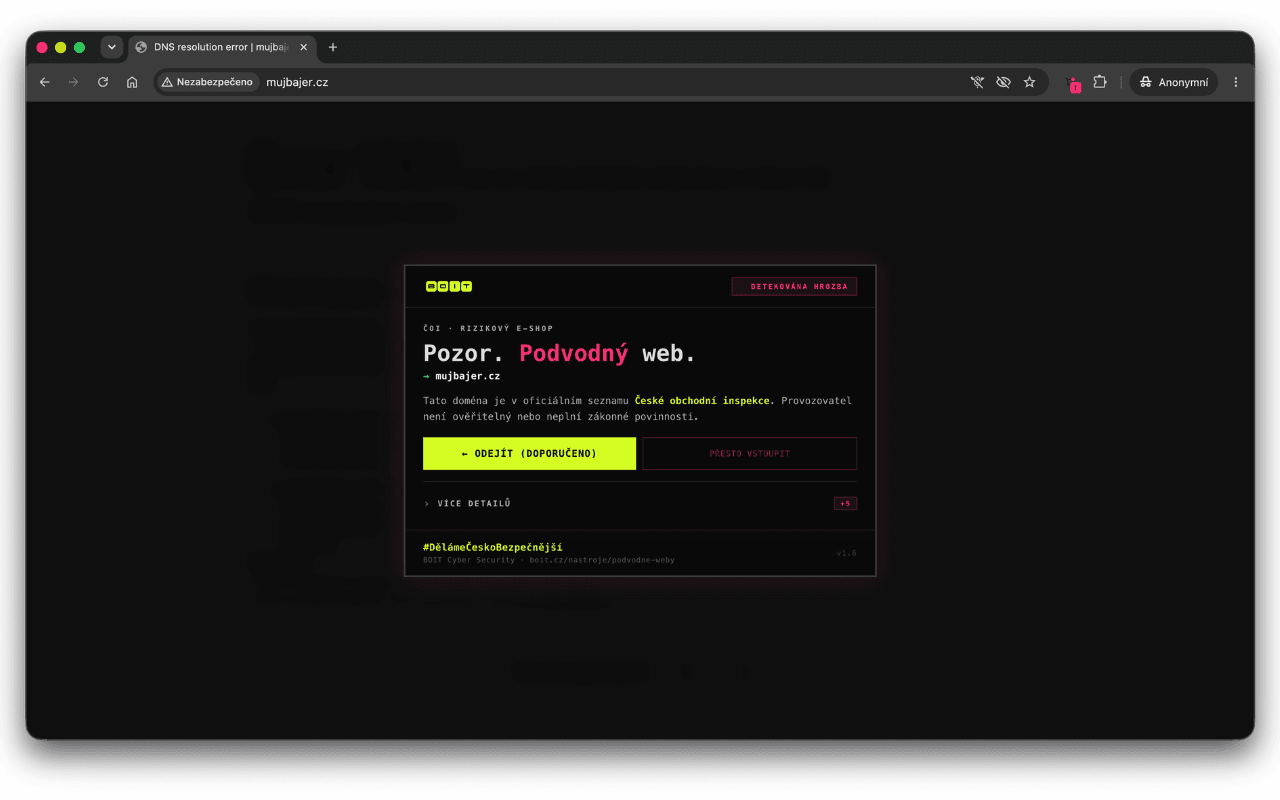
The extension works in the background. When you visit an online shop, it checks its domain and assesses basic signals that may indicate a problem.
It compares the domain you visit against public lists from the Czech and Slovak Trade Inspection authorities, which it regularly updates.
It looks for things such as missing company registration numbers and contact details, insecure connections, suspicious domains, extreme discounts or bank transfer as the only payment option.
If it finds a risk, it blurs the page content, explains why and recommends leaving. The browser toolbar icon also shows the status.
Choose your browser and confirm installation in its official store. You do not need to create a BOIT account or enter payment details.
Chrome, Edge and other Chromium browsers use the Chrome Web Store. Firefox has its own add-ons catalogue.
Select “Add to Chrome” or “Add to Firefox” and review the permissions shown.
The extension activates automatically. You can pin its icon to the toolbar to see the page status at any time.
The extension alerts you when it finds a risk. Before buying, still use your own judgement and the checklist below.
The extension does not send BOIT your browsing history or personal data. It has no trackers, analytics or ads. It only downloads the public ČOI and SOI lists from the internet at regular intervals.
View source code (opens in a new tab)The extension helps, but the final decision is yours. You can complete this quick check before buying.
Find the company name, company registration number (IČO) and registered office. The details must make sense and match public registers.
An anonymous form alone is not enough. Look for a working email address, phone number and clear complaints procedure.
An extreme discount, time pressure or a last-item claim may be a way to make you stop thinking.
Be wary if an unfamiliar shop only accepts payment in advance by bank transfer. Recovering money sent by bank transfer is often difficult.
Look for experiences outside the shop's own website. Check the domain with ČOI and look at the history and credibility of reviews.
You do not have to prove it is a scam in a few seconds. Just stop the purchase and check further.
Do not enter your card, address or login details until you have verified the shop.
Do not send money in advance to an unfamiliar shop's account just because no other option is available.
Compare the company registration number (IČO), contact details and terms and conditions with information from independent sources.
You can report a suspicious Czech shop to ČOI and a Slovak shop to SOI. The extension helps you do that.
A short, honest review helps others decide whether the extension is useful for them. It also shows us what works and what we should improve.
Google may require you to sign in before writing a review. Please submit technical issues and suggestions through the separate report form.
That is why our tools do more than check or generate something. We want you to come away with a little more understanding of how to protect yourself online.
We are building #BezpečnějšíČesko.